Search
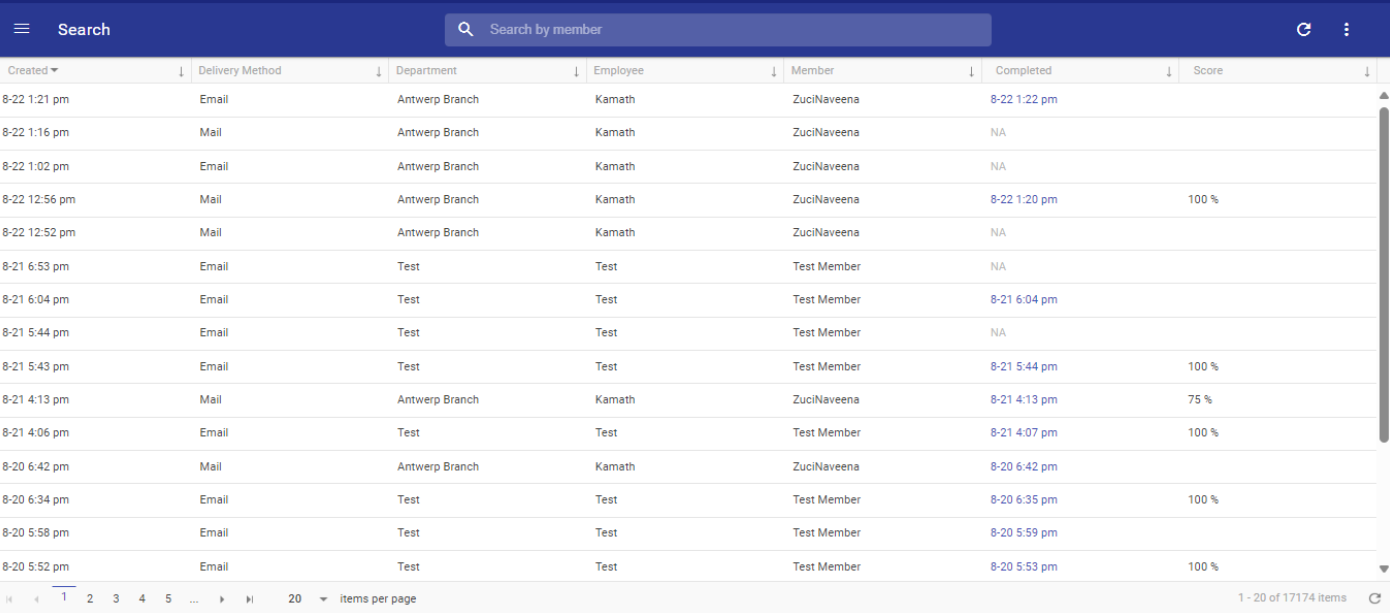
The Search tab allows users to quickly find and filter survey responses within the application.
Column Details: The tab displays key information, including:
- Search by Member: Users can now search for records by entering a member's name in the search bar. This feature helps in quickly filtering through thousands of entries to find specific data related to a particular member.
- Sortable Columns: All columns within the Search tab, including "Created," "Delivery Method," "Department," "Employee," "Member," "Completed," and "Score," are sortable. This allows users to organize the data in ascending or descending order based on the selected column.
- Pagination and Item Count: The tab supports pagination, allowing users to navigate through pages of records. It also displays the total number of items, providing an overview of the dataset size.
- Detailed Record Display: Each record in the Search tab provides detailed information such as:
- Created: The date and time when the entry was created.
- Delivery Method: The method used to deliver the response (e.g., Email).
- Department and Employee: The department and employee associated with the record.
- Member: The name of the member who participated.
- Completed: The date and time the task was completed, if applicable.
- Score: The score associated with the completed task, displayed as a percentage.